AWS AI-DLC: The Agentic Dev Lifecycle That Works Everywhere
Master AWS AI-DLC for disciplined AI pair-programming. Works across Kiro, Cursor, Claude Code, and Copilot with zero lock-in.
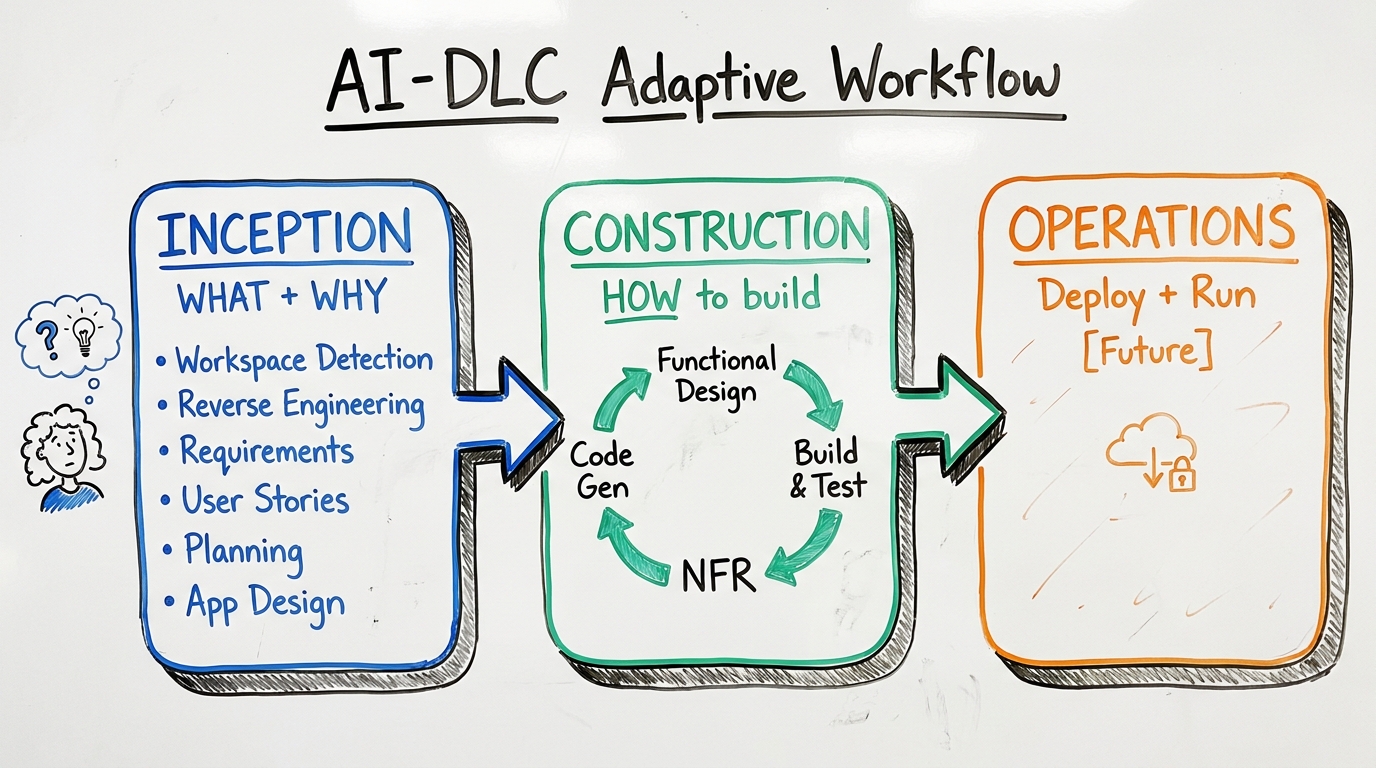
TL;DR: AWS AI-DLC organizes AI-assisted delivery around explicit requirements, reviewed designs, implementation, and verification. The current AI-DLC Workflows distribution includes an installed runtime and harness-specific setup; use its documented workflow profiles instead of copying legacy rule files into every IDE.
Key Takeaways
- Choose a workflow profile for the actual task: a narrow bug fix and a new production feature need different artifacts and review depth.
- On an existing codebase, identify the current implementation, integration boundaries, and relevant checks before approving a design.
- Review evidence against the code revision it describes. A completed state file does not prove the application works.
- Keep requirements, decisions, verification evidence, and handoff notes in the project's workflow record; configure each coding harness separately.
- The concrete pilot below is an illustrative implementation plan, not a benchmark or a claim that AI-DLC has already improved a team's delivery speed.
What Changed in the Current AWS AI-DLC Workflow?
The official AI-DLC Workflows repository, checked September 11, 2026, describes a harness-neutral engine with native setup for supported coding assistants. Its getting-started guide now documents installation, project configuration, and a diagnostic command. The older description of AI-DLC as only Markdown rules with no CLI is no longer an accurate installation guide.
The workflow profiles guide distinguishes Classic, Express, Feature, Bugfix, and other scopes. Select one based on the work and review its planned stages. Do not treat the detailed stage list, extension layout, or aidlc-docs/aidlc-state.md tree from an older release as the current file contract.
AWS's AI-Driven Development Life Cycle overview explains the methodology. The release's own guides determine installation and behavior. For ongoing maintenance, see maintaining AI-DLC projects.
What problem does AI-DLC solve?
Consider an agent asked to add an order endpoint. It could create a new authentication service even though the repository already has one, choose a database the team does not operate, or ship a happy-path handler without a retry contract. Those are failures to establish requirements and context before implementation.
AI-DLC makes that work explicit: understand the intent, inspect the existing system, record a plan, and review evidence as implementation progresses. The useful output is a set of decisions another engineer can inspect, not merely a longer conversation with an agent.
What are the three phases of AI-DLC?

The diagram illustrates the methodology; it is not an exact stage map for every installed profile.
The current profiles include applicable operation stages; Operations should not be assumed to remain an unimplemented placeholder. Review the selected profile's stage plan before starting.
Which workflow profile should you choose for a pilot?
Use the official profile descriptions to shortlist a scope, then verify what the engine proposes. The acceptance evidence in this table is an editorial recommendation for a pilot, not an additional AWS requirement.
A profile name is not a delivery estimate. Stop expanding the pilot when it would require an unresolved product decision, a new service dependency, or an owner for deployment that the team has not identified.
How do you configure an existing repository safely?
Follow the install and lifecycle guide for a selected release. Record the release and harness version used for the pilot. Inspect generated configuration before committing it, especially in a repository with existing agent instructions.
After installing that release, the getting-started guide documents this configuration sequence for Claude Code:
Use the documented harness value for another assistant. Invocation conventions differ too: the guide uses /aidlc in Claude Code and $aidlc in Codex. These commands are documentation examples; they were not executed against a production project for this article.
Instruction-file discovery is a separate concern from workflow state. Our AGENTS.md, CLAUDE.md, and Cursor rules comparison explains why copying the same file to a different path does not establish that every tool loaded it.
Why does reverse engineering matter for brownfield code?
The official first-workflow walkthrough describes workspace detection and traceable artifacts. For an existing system, ask the agent to connect each architectural claim to repository evidence before approving changes.
For an order-processing pilot, an illustrative inventory might look like this:
Do not fill unknown entries with plausible filenames or assumed coverage percentages. The reviewer should be able to follow each reference to actual code. If the code revision changes after the review, reassess the affected findings; a recent artifact timestamp alone is insufficient.
How does application design differ from units generation?
Application design answers “what are the building blocks?” It identifies components, responsibilities, and interfaces. Units of work answer “how do we divide implementation into reviewable pieces?” Those boundaries can differ: one user-facing capability may span an API, a background worker, and storage.
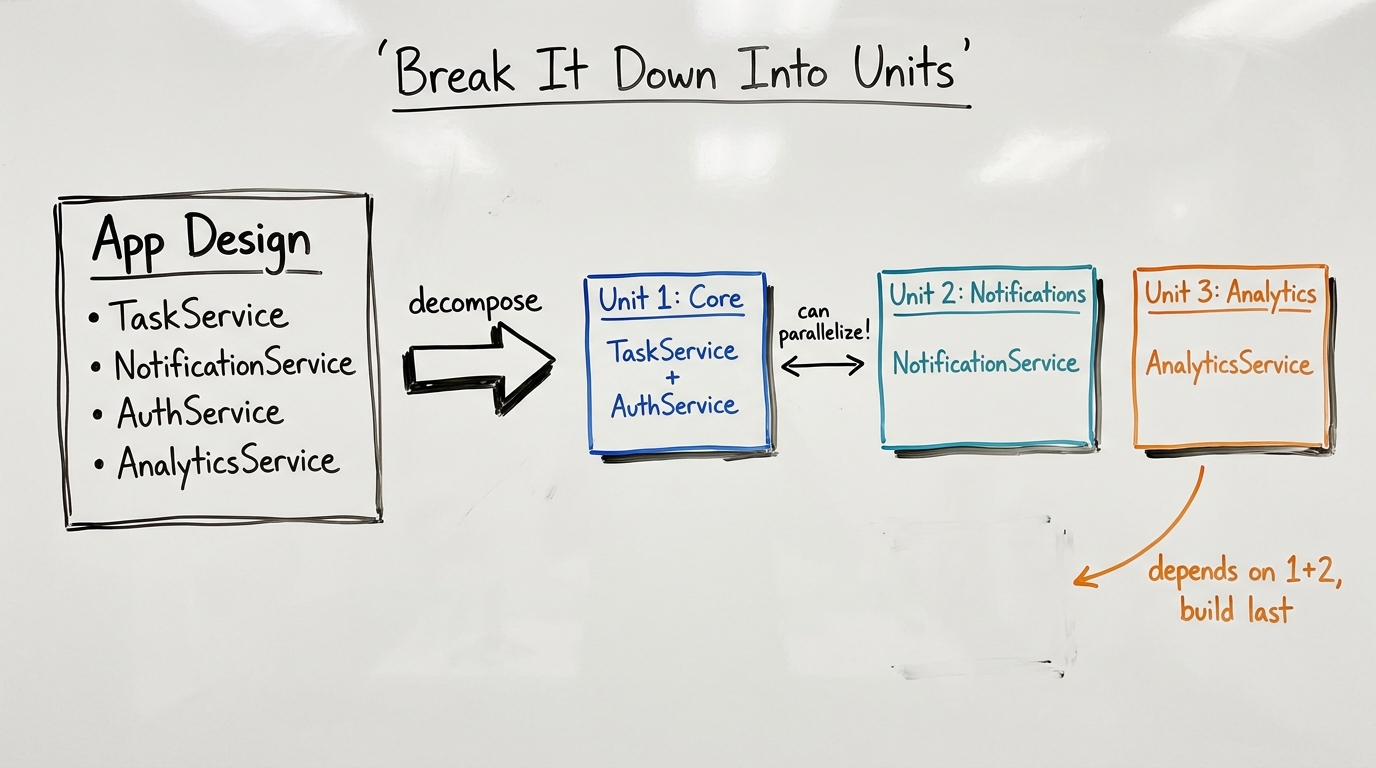
This retained diagram illustrates decomposition, not the exact stage names of every current profile. Consider the original task-management example:
A useful first unit could be “assign a task and enqueue its notification,” including the authorization check, transaction boundary, and contract test. “Implement every database table” is a different decomposition that might leave no user-visible capability reviewable until later. Choose the boundary deliberately.
What is a unit of work?
A unit is a coherent scope that can be designed, implemented, and checked against acceptance criteria. It need not be a microservice, a file, or a sprint.
Parallel work becomes useful after shared interfaces and ownership are clear. If two units change the same migration or public interface, coordinate that dependency instead of treating the units as independent.
What happens inside a per-unit construction loop?
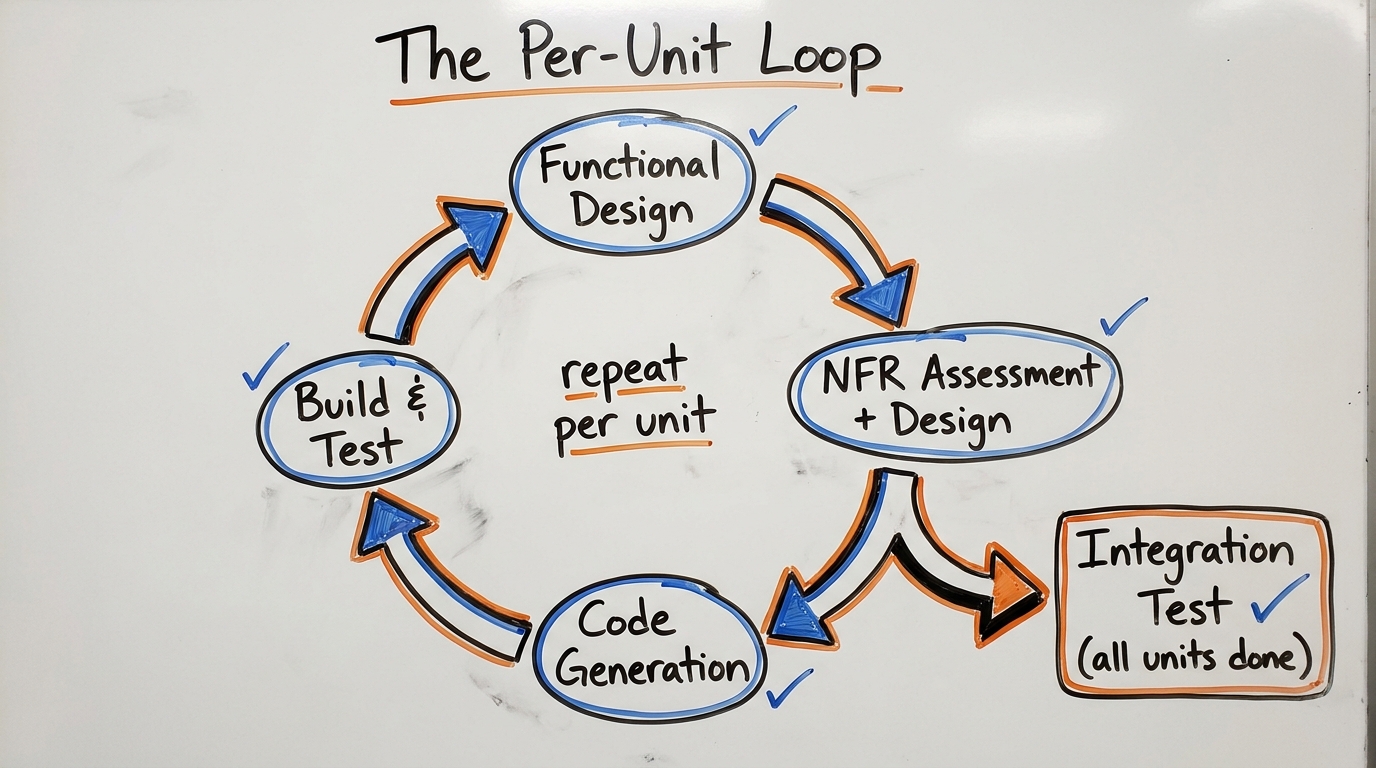
The retained illustration describes the design/build rhythm. Map it to the stages actually selected by the installed profile:
A unit that passes its own checks can still break another unit through a changed interface. Integration verification therefore remains a separate responsibility. Record both the local result and the revision of any dependency used during verification.
The distinction between NFR requirements and NFR design is also useful. Requirements state the quality needed; design proposes how to achieve it. “Search must meet our agreed percentile latency under the specified workload” is a requirement. “Introduce caching” is a design proposal whose effect still needs measurement. Do not use a technology choice as evidence that the requirement has been met.
What would a concrete AI-DLC implementation unit look like?
Conceptual example: add duplicate-submission protection to an existing order API. Assume authentication and order persistence already exist, and that the provider's idempotency behavior still needs confirmation. No load test, payment request, or benchmark was performed for this example.
An appropriate unit includes the handler, persistence contract, migration, and related checks. Splitting them into independent assignments without agreeing the shared contract would create integration work the plan has hidden.
What should the reviewer check before approving construction?
- The requirements specify duplicate, conflicting, concurrent, and interrupted requests.
- The proposed change reuses the existing authentication and persistence boundaries.
- Any external API assumption has a source or remains explicitly unresolved.
- The implementation plan names the affected modules and acceptance checks.
- The deployment owner can explain how old and new code behave during rollout.
This checklist complements the lifecycle rather than duplicating its stages. For broader agent architecture boundaries, see AgentCore vs LangChain.
How do non-functional requirements become reviewable?
A requirement such as “fast and secure” cannot be verified. Specify the workload, metric, environment, and decision threshold before running a check.
These are proposed requirements, not measured results or compliance certifications. For agent workloads, connect the checks to tracing and evaluation so a failed run has inspectable evidence.
How should approval gates and enterprise rules be used?
The current workflow guides describe human approval gates and review evidence. At a gate, inspect the actual artifact or diff, the unresolved assumptions, and the validation result. A reviewer should approve a specific revision and scope.
Repository policy and external controls still need independent enforcement. A workflow instruction to require authorization does not itself configure IAM, protect a branch, or establish regulatory compliance. Likewise, an extension convention from an older release should not be assumed to work with the installed engine. Consult that release's customization documentation before porting enterprise rules.
Why keep workflow instructions separate from project artifacts?
Instructions describe how the assistant should work. Artifacts describe what this project has decided and what has actually happened. Keeping them separate lets a team update tooling without silently rewriting a project's requirements or approval history.
The original “recipe and kitchen” analogy still applies: instructions are the recipe, while project records document the work. The current installation guide determines the actual directories; do not use a legacy rule-file tree as a setup command.
How does a review gate prevent assumptions from becoming code?
For the task-management example, “notify the assignee” leaves material questions open: which channel, what happens if delivery fails, and whether a reassignment sends another notification. Ask those questions before implementing a provider-specific notification service.
A useful gate follows generate, present, review, record. Present the proposed behavior with the unresolved choices. When the reviewer approves, attach the decision to the actual artifact revision. If a later change invalidates the assumption, reopen that decision rather than relying on the earlier approval label.
Use the approved scope to decide which questions are material. A known bug with established behavior should not restart every product decision. That is where the profile's adaptive scope helps: reduce unnecessary ceremony while retaining evidence for the decision that changed.
How does session continuity work across coding agents?
The current first-workflow guide uses records under aidlc/spaces/default/intents/, with lifecycle artifacts in the intent's record. Configure the second harness against the same project and review the current record before resuming.
A useful handoff contains the code revision, selected profile, last approved artifact, completed checks, remaining uncertainties, and next permitted action. If two people work concurrently, agree who owns the shared record and how changes are reviewed. Sharing a directory does not provide conflict-free concurrent editing or guarantee that another model interprets every prior decision correctly.
Who should use AI-DLC?
Try a bounded pilot when your team repeatedly loses requirements, architectural context, or verification evidence between AI coding sessions. Judge the pilot by whether reviewers can reconstruct decisions and whether acceptance checks cover the original request.
Record review effort and rework alongside implementation time. Compare similar tasks and retain the selected release, profile, and harness configuration. This article does not establish a productivity multiplier or guarantee faster delivery.
FAQ
Is AI-DLC only a set of rule files?
No. That describes an older installation approach. The current AWS Labs distribution includes an aidlc command and harness runtimes, with project configuration and diagnostics documented in its getting-started guide. The methodology remains separate from the application you build.
Can I use AI-DLC with Claude Code or Codex?
Both are documented harnesses. Configure the selected release for the harness you use and follow its invocation instructions. Do not assume CLAUDE.md and AGENTS.md have identical discovery or import behavior.
Can a simple bug fix skip a full feature workflow?
Inspect the Bugfix profile for a known defect. Express assumes the requirements are already understood; use PoC when the question is feasibility. Keep the evidence needed to reproduce and verify the defect even when larger design artifacts are unnecessary.
Can different team members use different IDEs on the same project?
The project records provide a shared basis for handoff, and supported harnesses have their own setup. Verify the same code revision, installed release, and workflow record before resuming; coordinate concurrent writers explicitly.
How does AI-DLC relate to AgentCore?
AI-DLC organizes development work. AgentCore supplies managed services for running and operating agents. A project can use AI-DLC during development and later deploy its application using AgentCore; one does not replace the other.
Where can I find release changes and examples?
Start with the official repository and its release-specific guides below. For related tooling changes, browse the AI Frontier Weekly archive.
Sources
Subscribe to the newsletter
About the Author
Aaron is an engineering leader, software architect, and founder with 18 years building distributed systems and cloud infrastructure. Now focused on LLM-powered platforms, agent orchestration, and production AI. He shares hands-on technical guides and framework comparisons at fp8.co.
Cite this Article
Related Articles
AI Coding Agent Architecture: Agent Loop Deep Dive
Explore how Claude Code, Cursor, Aider, and Cline work under the hood. Agent loops, tool dispatch, and edit strategies explained.
AI EngineeringHow to Build Claude Code Skills: 5 Examples (2026)
Build custom Claude Code Skills with 5 ready-to-use examples. Covers SKILL.md spec, security controls, plugin distribution, and team sharing workflows.
AI Development ToolsOpenClaw vs Hermes: How AI Agents Cut Tokens 75%
25-section vs 9-layer prompts, frozen memory, 5-phase compression: how OpenClaw and Hermes cut agent token costs ~75%. Real code, side-by-side.
AI Engineering