AI Coding Agent Architecture: Agent Loop Deep Dive
Explore how Claude Code, Cursor, Aider, and Cline work under the hood. Agent loops, tool dispatch, and edit strategies explained.
TL;DR: Modern AI coding agents — Claude Code, Cursor, Aider, and Cline — all implement variations of the same core pattern: an agent loop that cycles between LLM reasoning and tool execution. They diverge in how they manage context windows, dispatch tools, apply code edits, and enforce safety boundaries. Understanding these architectural differences helps you choose the right tool, extend it effectively, and build your own agent systems. This analysis covers the five key architectural layers shared by every production coding agent in 2026.
Key Takeaways
- Every AI coding agent runs an agent loop: the LLM receives context, decides on a tool call (or a response), the tool executes, and the result feeds back into the next iteration until the task is complete.
- Context engineering is the primary differentiator — agents use repository maps, codebase indexing, conversation compaction, and file-scoping strategies to fit relevant information into finite context windows.
- Tool systems range from minimal (Aider: file read/write only) to comprehensive (Claude Code: 15+ tools including bash, grep, glob, web fetch, and LSP integration), and this scope directly shapes what tasks an agent can handle autonomously.
- Edit strategies vary significantly: whole-file replacement (simple but token-heavy), search-and-replace blocks (Aider's default), structured diff format (Claude Code), and AST-aware edits (Cursor), each with different reliability and cost profiles.
- Permission and safety models are architectural decisions, not afterthoughts — Claude Code uses allowlists with user approval prompts, Cursor sandboxes terminal commands, and Aider auto-commits every change for instant rollback.
- The trend toward multi-agent and plan-then-execute patterns (Aider's Architect+Editor, Cursor's background agents) reflects the limits of single-loop architectures on complex, multi-file tasks.
Why does coding agent architecture matter?
In the past twelve months, AI coding agents have moved from autocomplete novelties to tools that ship production code. Claude Code, Cursor, Aider, and Cline collectively serve millions of developers, and their architectural choices determine what kinds of tasks they can handle, how reliably they complete them, and how much they cost to run.
Yet most developers treat these tools as black boxes. Understanding the architecture underneath reveals why certain tools excel at specific tasks, why context limits cause failures, and how to configure agents for maximum effectiveness. It also provides the foundation for anyone building custom agent systems — the patterns are general, even if the implementations differ.
This article dissects the five architectural layers shared by every production coding agent: the agent loop, context engineering, tool dispatch, edit strategies, and safety models. We draw on recent open-source analyses of Claude Code internals, Aider's public codebase, and documented behavior of Cursor and Cline to provide a technically grounded comparison.
What does the core agent loop look like?
Every coding agent implements the same fundamental loop:
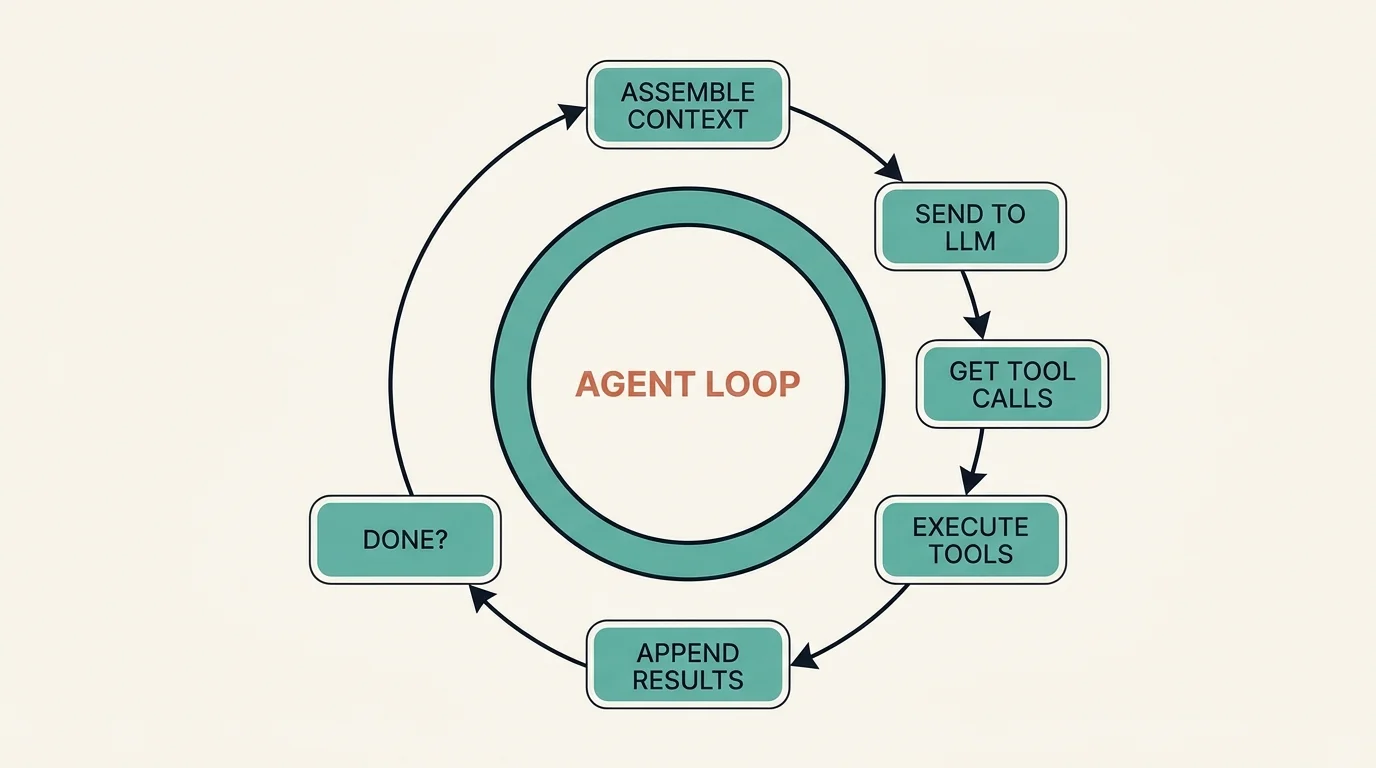
The cycle runs: (1) assemble context (system prompt, conversation history, tool results); (2) send to the LLM; (3) the LLM returns text and/or tool calls; (4) execute the tool calls and collect results; (5) append results to the conversation; (6) if the task is complete, respond to the user — if not, return to step 1.
This is a ReAct (Reasoning + Acting) loop. The LLM reasons about the current state, decides on an action, observes the result, and repeats. The simplicity of this pattern is deceptive — production implementations handle dozens of edge cases: tool call failures, context window overflow, user interruption, concurrent tool execution, and safety boundary enforcement.
Claude Code's Agent Loop
Claude Code runs a single-threaded agent loop in the terminal. Each iteration sends the full conversation (system prompt, CLAUDE.md instructions, message history, and tool results) to the Claude API. The model responds with a mix of text (shown to the user) and tool calls (executed locally). Tool results are appended as assistant/tool message pairs, and the loop continues until Claude produces a text-only response with no tool calls.
A critical implementation detail: Claude Code uses streaming responses, so text appears in the terminal as the model generates it, but tool calls are buffered until the full response is received. This means the user sees reasoning in real-time but tool execution happens in discrete batches after each LLM turn.
Aider's Architect-Editor Pattern
Aider introduced a significant variation: the two-model pattern. An "Architect" model (typically a frontier model like Claude Opus or GPT-4) analyzes the task and produces a plan. An "Editor" model (often the same or a smaller model) then executes the plan by generating specific code edits. This separation improves reliability on complex tasks because the planning step can reason at a high level without simultaneously managing edit syntax.
Cursor's Multi-Agent Architecture
Cursor operates multiple agent types simultaneously within the IDE. Tab provides inline completions using a fast, fine-tuned model. Cmd+K handles targeted inline edits. The Composer agent handles multi-file tasks using a full agent loop. Background agents can run autonomously on separate tasks. Each agent type has its own context assembly strategy, tool set, and execution model.
This multi-agent approach allows Cursor to optimize for latency (Tab needs sub-200ms responses) and capability (Composer can take minutes to complete complex refactors) simultaneously. The trade-off is architectural complexity — coordinating state between agents requires careful design to avoid conflicts.
Cline's Human-in-the-Loop Loop
Cline implements a strict approval-based agent loop as a VS Code extension. Every tool call is presented to the user for approval before execution. This makes Cline the most conservative agent architecturally — it trades autonomy for safety. Cline also supports Plan and Act modes: in Plan mode, the agent produces a complete plan before executing any actions; in Act mode, it executes step by step with approvals.
Why is context engineering the critical differentiator?
The agent loop is straightforward. Context engineering — deciding what information goes into each LLM call — is where coding agents win or lose. A 200K-token context window sounds large until you need to understand a codebase with millions of lines of code.
Repository Maps
Aider pioneered the repository map approach. Using tree-sitter, Aider parses every file in the repository and generates a condensed map showing class definitions, function signatures, and import relationships — without function bodies. This map typically compresses a large codebase into a few thousand tokens while preserving the structural information the LLM needs to understand code relationships.
When the LLM needs to edit a specific file, Aider adds the full file contents to the context alongside the map. This two-tier strategy — summary for orientation, full content for editing — is elegant and token-efficient.
Codebase Indexing
Cursor takes a different approach: it builds a vector index of the entire codebase. When the user references @codebase or the agent needs to find relevant code, Cursor performs semantic search over this index and injects the top results into the context. This handles natural language queries well ("where is the authentication logic?") but can miss structural relationships that a repository map would capture.
Conversation Compaction
Claude Code addresses context limits through conversation compaction. When the conversation approaches the context window limit, Claude Code automatically summarizes earlier messages — preserving key decisions, file paths, and code snippets while discarding verbose tool output. This allows long-running sessions (hundreds of tool calls) without hitting context limits.
Context Assembly Comparison
How does an agent dispatch and execute tools?
Tools are the agent's hands. The range and reliability of available tools determine what tasks an agent can complete autonomously.
Tool Inventory Comparison
Claude Code has the broadest tool set, reflecting its design as a general-purpose coding agent. Aider intentionally keeps tools minimal — it reads files, writes edits, and runs shell commands. This minimalism reduces the surface area for errors and keeps the agent focused on code editing.
Parallel Tool Execution
A significant architectural difference is how agents handle multiple tool calls. Claude Code can execute independent tool calls in parallel within a single LLM turn — if the model requests both a Grep and a Glob simultaneously, they run concurrently. This reduces wall-clock time for exploration-heavy tasks.
Cursor achieves parallelism at a different level — multiple agents can run simultaneously on different tasks. Aider and Cline execute tools sequentially.
Tool Result Handling
How agents handle tool failures significantly affects reliability. Claude Code includes error messages in tool results, allowing the LLM to reason about failures and retry with different approaches. Aider applies a lint-fix cycle: after generating edits, it runs the linter and, if errors are found, feeds them back to the LLM for correction. Cursor uses IDE diagnostics (TypeScript errors, ESLint warnings) as feedback signals.
How do coding agents actually modify code?
The most consequential architectural decision for a coding agent is how it generates and applies code edits. Different strategies trade off token cost, reliability, and precision.
Whole-File Replacement
The simplest approach: the LLM outputs the entire file with changes applied. This is unambiguous — there is no diff to misapply — but extremely token-heavy. A 500-line file costs 500 lines of output tokens even for a one-line change. Aider uses this as a fallback for models that struggle with diff formats.
Search-and-Replace Blocks
Aider's primary edit format asks the LLM to produce paired search and replace blocks:
This format is token-efficient and works reliably with most models. The risk is search block mismatches — if the LLM produces a search block that does not exactly match the file content (whitespace differences, stale content), the edit fails. Aider mitigates this with fuzzy matching.
Structured Edit Tool
Claude Code uses a structured Edit tool where the LLM provides old_string and new_string as JSON parameters:
This approach has a built-in uniqueness constraint: the old_string must appear exactly once in the file, preventing ambiguous edits. If it matches zero or multiple times, the tool returns an error, and the LLM can adjust. This is more reliable than search/replace blocks because the error is caught before application.
AST-Aware Edits
Cursor leverages its IDE integration to apply edits at the AST (Abstract Syntax Tree) level. Rather than text-based search and replace, Cursor can target specific syntax nodes (functions, classes, imports) and apply transformations that respect code structure. This is the most precise approach but requires language-specific parsing.
Edit Strategy Comparison
How do permission and safety models work?
Coding agents execute arbitrary code on your machine. The safety model determines how much autonomy the agent has and how catastrophic failures are contained.
Claude Code: Allowlists and Approval Prompts
Claude Code implements a layered permission system. A settings.json file defines allowlists for tools and commands — glob patterns that specify which operations are pre-approved. Any operation not on the allowlist triggers a user approval prompt in the terminal. Users can approve once, approve for the session, or deny.
This model gives experienced developers a way to grant broad autonomy while maintaining guardrails on destructive operations. The per-project settings mean a trusted internal project can have permissive rules while an unfamiliar codebase stays locked down.
Aider: Git as Safety Net
Aider takes a fundamentally different approach: every set of edits is automatically committed to git. If the agent produces broken code, you run git diff to see exactly what changed and git checkout to revert. This makes Aider the most reversible agent — every action has a one-command undo.
The trade-off is git history pollution. A complex task might produce dozens of small commits. Aider addresses this with --auto-commits (on by default) and --dirty-commits flags that let users control commit behavior.
Cursor: IDE Sandboxing
Cursor sandboxes terminal command execution and provides a diff review interface for code changes. Users can accept or reject individual edits before they are applied. The IDE integration means changes appear as unsaved modifications that can be reverted with standard undo.
Cline: Explicit Approval
Cline requires explicit user approval for every tool call. This is the most secure model — nothing executes without human confirmation — but it is also the slowest for complex tasks that require many tool calls. Cline mitigates this with its Plan mode, where users approve the entire plan upfront rather than individual steps.
What are the emerging multi-agent and plan-execute patterns?
Single-loop agent architectures hit limits on complex tasks. When a refactor touches 20 files across 5 modules, a single agent loop struggles with context management and error accumulation. Two patterns are emerging to address this.
Plan-Then-Execute
The agent first produces a complete plan (which files to modify, in what order, and why), gets user approval, then executes the plan step by step. Claude Code supports this through its Plan mode, where the model produces a structured plan before writing any code. Cline implements this natively with separate Plan and Act modes.
The plan serves as a persistent reference that survives context compaction. Even if early conversation details are summarized away, the plan remains as an anchor for what the agent is trying to accomplish.
Sub-Agent Delegation
Claude Code's Agent tool lets the primary agent spawn sub-agents that work on isolated subtasks. Each sub-agent gets its own context window, can work in a separate git worktree, and returns a summary to the parent agent. This pattern enables parallel execution of independent tasks and prevents any single task from consuming the entire context window.
Cursor's background agents achieve something similar at the IDE level — you can launch multiple agents working on different tasks simultaneously.
What should you decide before building your own agent?
If you are building a custom coding agent or extending an existing one, these are the key architectural decisions:
Agent loop granularity. Single-loop (Claude Code, Cline) vs. multi-phase (Aider's Architect+Editor) vs. multi-agent (Cursor's background agents). Single loops are simpler to implement and debug. Multi-phase improves reliability on complex tasks. Multi-agent enables parallelism but requires coordination.
Context strategy. Repository maps (Aider) work well for codebases under 100K lines. Vector indexing (Cursor) scales to larger codebases but requires infrastructure. Conversation compaction (Claude Code) is essential for long-running sessions regardless of other strategies.
Edit format. Search/replace is the most portable format (works with any model). Structured tool calls are more reliable but require tool-use capable models. AST-aware edits are most precise but require language-specific tooling.
Safety boundary. Git-based safety (Aider) is simple and effective for solo developers. Allowlist-based (Claude Code) suits teams with varying trust levels. Approval-based (Cline) suits security-sensitive environments.
Tool scope. More tools enable more autonomous behavior but increase the failure surface. Start with file read, file edit, and shell execution. Add search tools (grep, glob) when context assembly needs to be agent-driven. Add web access and sub-agents only when tasks require them.
Which AI coding agents use these patterns?
The agent loop architecture described in this article powers every major AI coding tool:
- Claude Code (Anthropic): Edit-Apply loop with tool streaming, parallel tool calls
- Cursor (Anysphere): Multi-file edit with speculative decoding, background indexing
- Cline (VS Code): Sequential tool execution with MCP integration
- Aider: Git-native edit format with repository mapping
- Continue: Open-source agent loop with customizable providers
- GitHub Copilot Workspace: Plan-execute pattern with PR generation
- Amazon Q Developer: AWS-integrated agent with IAM-aware tool dispatch
FAQ
How does an AI coding agent differ from a chatbot with code generation?
A chatbot generates code in response to a prompt and presents it to the user. A coding agent executes a loop: it reads your codebase, decides what to do, makes changes directly to files, runs tests to verify, and iterates until the task is complete. The key architectural difference is the tool execution layer — agents have the ability to read files, write edits, run shell commands, and observe results, turning the LLM from a text generator into an autonomous actor in your development environment.
What determines which coding agent is fastest for a given task?
Three factors dominate: context assembly speed (how quickly the agent gathers relevant information), LLM inference latency (determined by model size and provider), and tool execution overhead (number of tool calls and their individual latency). For small, targeted edits, Cursor's inline completion is fastest because it uses a small, fast model and needs minimal context. For large refactors, Claude Code's parallel tool execution and sub-agent delegation can outperform sequential agents. Aider's repository map provides fast orientation on unfamiliar codebases but adds upfront parsing time.
Can I combine multiple coding agents on the same project?
Yes, and many teams do. A common pattern is using Cursor for interactive development (inline edits, quick refactors) and Claude Code for complex autonomous tasks (multi-file refactors, debugging sessions, infrastructure work). Aider works well for batch-mode changes from the command line. Since all agents operate on standard files and git, they are interoperable as long as you avoid simultaneous conflicting edits. Use branches to isolate work when running multiple agents concurrently.
Why do coding agents sometimes fail on large codebases?
The primary failure mode is context window saturation. When a codebase is large and the agent cannot fit enough relevant information into the context window, it makes incorrect assumptions about code structure, missing dependencies, or existing implementations. The secondary failure mode is error accumulation — each tool call has a small probability of producing an incorrect result, and over a long chain of tool calls, these errors compound. Both failure modes are mitigated by better context engineering (repository maps, targeted file scoping) and shorter action chains (plan-then-execute, sub-agent delegation).
Subscribe to the newsletter
About the Author
Aaron is an engineering leader, software architect, and founder with 18 years building distributed systems and cloud infrastructure. Now focused on LLM-powered platforms, agent orchestration, and production AI. He shares hands-on technical guides and framework comparisons at fp8.co.
Cite this Article
Related Articles
How to Build Claude Code Skills: 5 Examples (2026)
Build custom Claude Code Skills with 5 ready-to-use examples. Covers SKILL.md spec, security controls, plugin distribution, and team sharing workflows.
AI Development ToolsContext Engineering for AI Agents: Cost and Reliability
Learn how caching, tool selection, memory and retrieval shape agent context, with cost calculations, failure cases and an evaluation checklist.
AI EngineeringAI Agent Frameworks Compared: LangChain vs Bedrock
Compare LangChain MCP Adapters, Bedrock Inline Agent SDK, and Multi-Agent Orchestrator. Architecture and code examples included.
Agent