IDP Part 2: Routing, Extraction & Timeline Generation
The action half of a production IDP pipeline: skip-routing, structured extraction, day-by-day timeline assembly, plus the queues and retries that scale it.
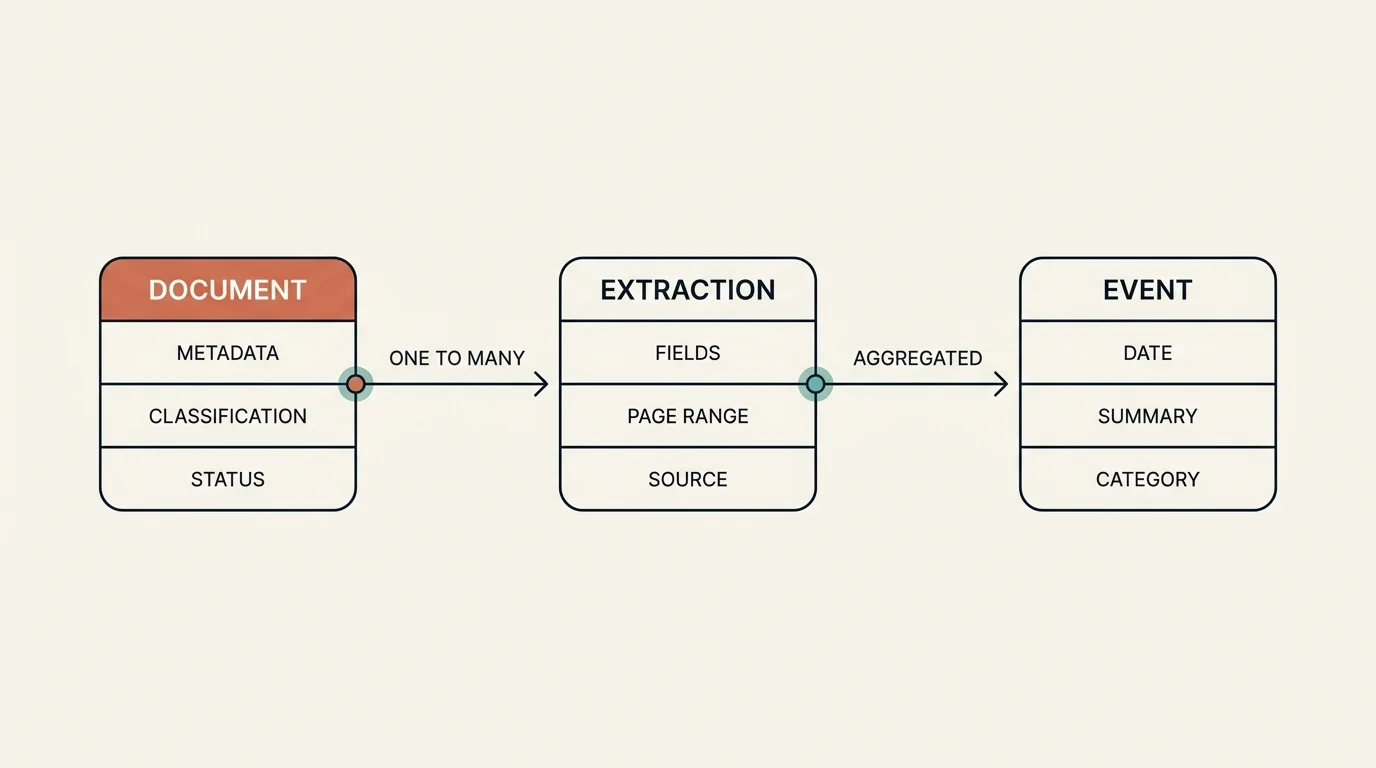
TL;DR: Part 1 of this series covered how an Intelligent Document Processing pipeline perceives a document — OCR plus a three-level classification hierarchy. Part 2 covers what it does next: a routing step that skips low-value documents, structured extraction that turns pages into typed records, and a timeline stage that merges every case document into a chronological day-by-day view. It closes with the infrastructure — capacity queues, event-driven orchestration, and retry logic — that lets the whole thing run unattended at scale. The lessons are framed as reusable patterns, not a specific codebase.
Key Takeaways
- Routing is a cheap gate that runs after classification: a document is skipped unless it carries a high-value type and is not flagged low-priority. Skipping early saves the expensive extraction step.
- There are three distinct skip mechanisms — issue-based (corrupted/password/empty), automatic (classification-driven), and manual (bulk or by-type) — and skips should be reversible, restoring the previous status rather than a blind default.
- Extraction is format-aware. Detect the document's source format and dispatch to the matching extractor, because different sources encode the same data in completely different layouts.
- Table extraction relies on OCR geometry, not flat text. Bounding boxes and table structure are what let the parser align codes, dates, and amounts into correct line items.
- Extracted records and timeline events are best stored as structured rows with a flexible JSON payload, full soft-delete and authorship fields, and per-record token accounting that tracks LLM spend.
- The system survives at scale through a capacity queue that meters work by page count (not job count), event-driven orchestration over an event bus, and a uniform retry-once-then-fail pattern with per-page timeout budgets.

Where We Left Off
In Part 1 a document was uploaded, OCR'd, and classified into a per-page outline with derived document-level types. That outline is now the input to everything that follows. The downstream pipeline — the orchestrator that owns these steps — runs them in order: classify (if not already done), decide whether to skip, detect the document's source format, generate any case-level overview, generate timeline events, extract structured tables when present, and finally mark the job complete.
The mindset shift from Part 1 is from perception to action. Up to now the pipeline has been deciding what the document is. From here it acts on that decision, and the first action is deciding whether to act at all.
How Does the Pipeline Decide What to Skip?
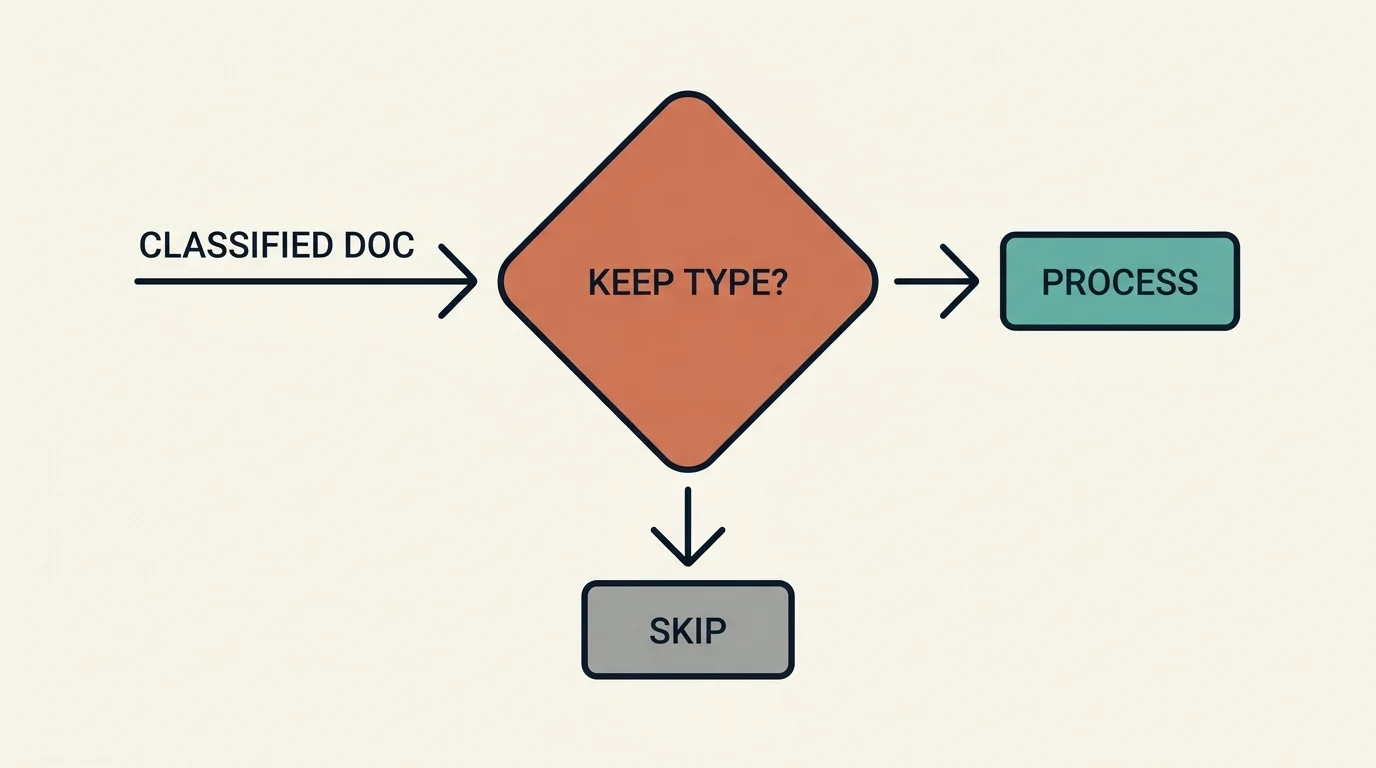
Not every page is worth the cost of extraction. An ID card, a fax cover sheet, a routine form — these are stored for completeness but add nothing to a case timeline. Running them through LLM extraction would burn tokens for no value. So immediately after classification, a routing step decides keep-or-skip.
The logic keys off the derived document types from Part 1: a document is skipped when it carries no high-value type (the categories that matter for the case) or it is explicitly flagged low-priority; it is processed when it has at least one high-value type and is not flagged low-priority. That is the whole predicate — a cheap boolean check over the classification result, no model call required.
There is a design subtlety worth naming. A routing predicate like this often grows a second, parallel signal that was meant to come from somewhere else — for example, a fast pre-OCR classifier that would set an early priority flag during upload. In practice that early path may never ship, leaving the field perpetually empty and the routing decision resting entirely on the text-based classification from Part 1. The check survives for backward compatibility. It confused me until I dug in, and the lesson generalizes: production routing code accretes optional signals you have to read carefully to know which ones actually fire.
That hypothetical pre-OCR classifier is worth a sentence, because it is a tempting pattern. The idea is to render the first few pages of a PDF to images and send them to a vision model for a fast, cheap guess before paying for full OCR, mapping high-value categories to "process" and everything else to "skip early." It trades accuracy for latency — a handful of page images versus the full OCR text — and that accuracy gap is exactly why a text-based path often wins and the image path quietly never ships. The general takeaway: an early-exit classifier can save real money, but only if its error rate is low enough that you trust it to drop documents unseen.
Three kinds of skip
"Skip" turns out to mean three different things:
The manual path usually has two flavors. Bulk skip takes an explicit list of documents and can revert — and the important detail is that revert restores each document to its previous status (captured before the skip), not blindly to "pending." Auto-skip by type takes a "keep these types" list for a whole case and skips everything not matching — the same predicate as automatic routing, applied in bulk on demand. Both manual paths stream progress to the UI, process in rate-limited batches, and protect documents that already have extracted data.
The status machine stays small and reversible: a pending document can be skipped (auto or manual) to a skipped state, a skipped document can be reverted back to its prior status, and a pending document moves into processing when the routing predicate says keep. Reversibility is the design value here. Skipping is an aggressive, cost-saving move; making every skip undoable, and restoring the exact prior status, means an over-eager auto-skip never destroys information a human later needs.
How Is Structured Data Extracted From a Kept Document?
Once a document survives routing, the pipeline detects its source format and routes to the matching extractor. This is the step people underestimate: one institution's export format looks completely different from another's billing software or a third party's report form. One generic parser would do all of them badly.
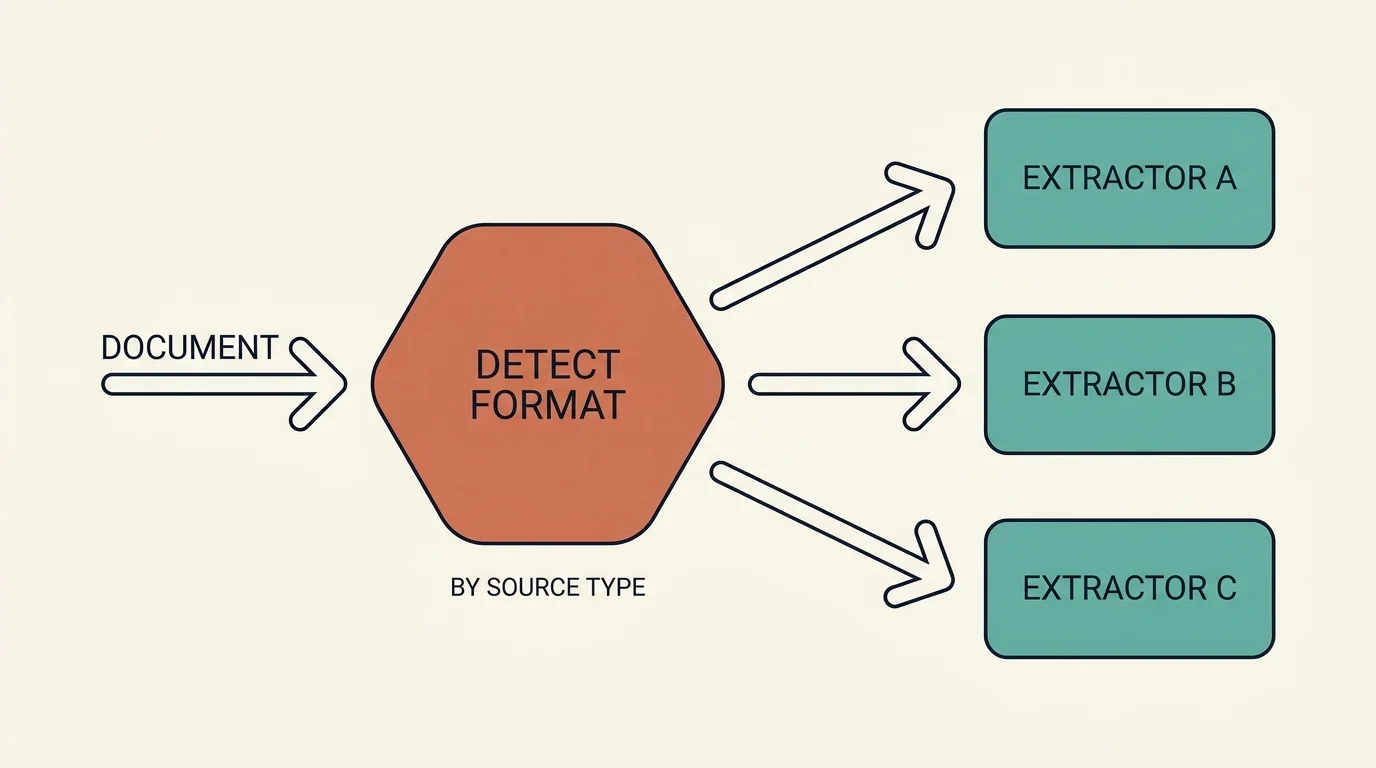
Format detection draws on the page-type outline, extracted source names, content patterns, and filename heuristics. The detected format then selects the extractor. A mature pipeline typically carries more than a dozen format variants and two generations of extractor — a legacy generator for a couple of older formats, and a modern generator for everything newer — with new documents taking the modern path. The naming of those variants is domain-specific; what matters architecturally is the dispatch pattern: classify the shape, then hand off to code that understands that shape.
Table extraction leans on geometry
Table extraction is its own sub-pipeline, and it is where the layout-preserving OCR format from Part 1 finally pays off. The flow is: detect the relevant pages from the outline, read the OCR blocks to reconstruct tables and identify line items using bounding boxes, have an LLM pull the structured fields (parties, dates, amounts, codes), classify the sub-type, and write the structured records.
This is why the pipeline stored two OCR formats. You cannot align a billing code with its amount and date from a flattened text stream — the columns collapse into a soup of numbers. The bounding boxes preserve which cells share a row and which column a value sits under, and the parser rebuilds the table from that geometry. Flat text is fine for "what type of page is this"; structured tables need the spatial layout.
Table extraction can also run fire-and-forget, in parallel with the main pipeline. When relevant pages are detected, a background job starts and does not block timeline generation. The two products — a structured table and a chronological timeline — are independent, so there is no reason to serialize them.
What an extracted record looks like
Extracted data is best stored as a structured row with a typed envelope plus a flexible JSON payload: a stable outer schema (an id, the owning job, the record type, a reference to a validation schema) wrapping a payload whose shape varies by type. A clinical event payload carries summary, date, provider, and procedure; a billing payload carries line items (amount, code, date, description) and diagnostic codes. A metadata block records which pages the record came from and, crucially, whether it was AI-generated or human-edited.
The provenance flags do real work here: any downstream view can tell AI output apart from human corrections without a second lookup. Pair them with full authorship and soft-delete fields (who created, who last updated, who deleted, and when), and in a domain where the output may end up in litigation that provenance is not optional — it is a hard requirement.
How Are Per-Document Events Assembled Into a Case Timeline?
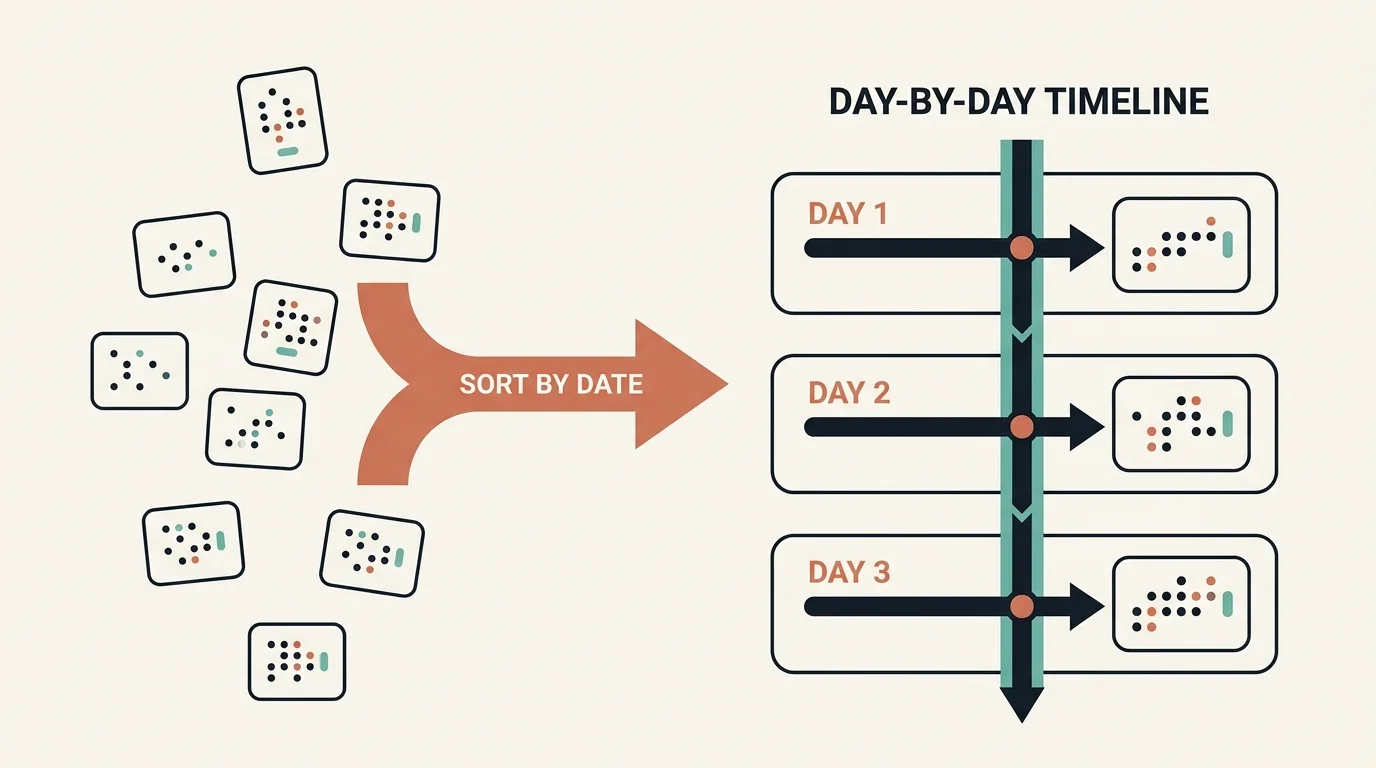
Extraction produces events scattered across many documents — an admission noted in one record, a charge from another source, a report from a third. The final stage, the day-by-day timeline, merges them into one chronological narrative for the case.
Each event is a structured row carrying its type and sub-type, a date, a summary, a reference back to the source pages, and a flexible data payload. One detail I appreciate in a design like this is per-event token accounting: fields that record the prompt and completion tokens spent both populating an event and sub-classifying it. That is how you actually understand unit economics in an LLM pipeline: not "what did the month cost" but "what does one timeline event cost to produce," the number that tells you whether the product is viable at scale. Events land in an events table and roll up into daily summaries.
When a case needs a full rebuild — new documents arrived, or the extraction logic improved — a regeneration routine reprocesses every document in the case: fetch all jobs, skip ones recently generated, queue them all, run each through classify → skip-check → format-detect → generate-events, then repair and deduplicate the merged timeline. Bulk reprocessing is metered by the same queues that protect the live path so a large case rebuild does not knock over the system.
What Holds the Whole Thing Together at Scale?
The stages above describe the happy path. Running thousands of documents a day unattended is mostly about the parts that are not the happy path.
A capacity queue that counts pages, not jobs
The naive way to limit concurrency is to cap the number of in-flight jobs. That fails badly here, because one job might be a 2-page card and the next a 600-page record. So the capacity queue meters by page count.
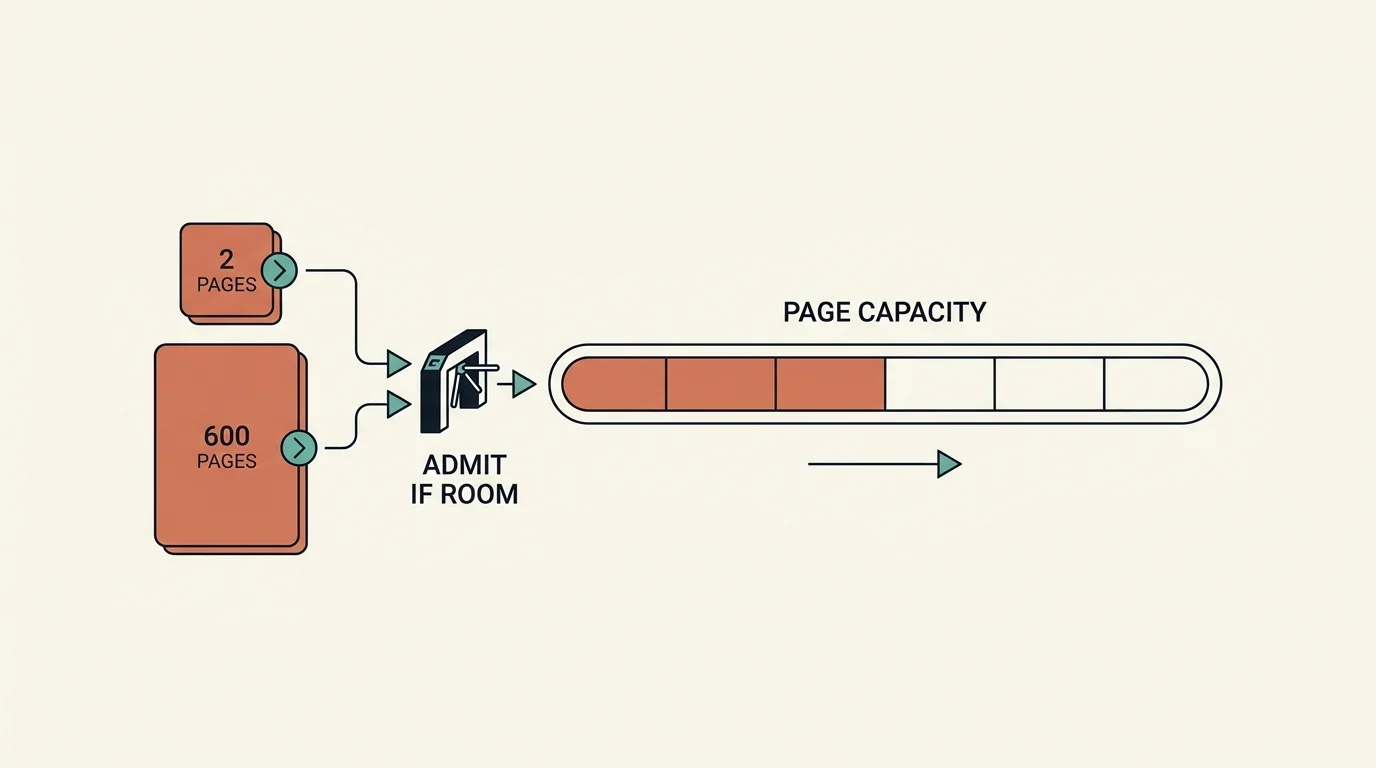
Metering by pages is the right unit because pages, not jobs, are what consume memory, CPU, and LLM tokens. Five 600-page documents are a far heavier load than fifty 2-page ones, and a job-count limiter cannot tell the difference. The queue tracks total pages in flight against a maximum and only admits a new document when there is room for its pages. This prevents memory exhaustion, CPU overload, and database connection saturation under bursty load. Work also gets enqueued to a durable queue for asynchronous processing, with explicit job types (auto-annotation, manual-annotation, timeline-generation, timeline-update) so the processor can prioritize and route appropriately.
Event-driven orchestration
An orchestration service listens to document lifecycle events over an event bus and triggers the right workflow for each. Events follow a subject.action.scope convention — upload-complete starts OCR, classify-complete routes to extraction, transcribe-complete kicks off a different downstream workflow.
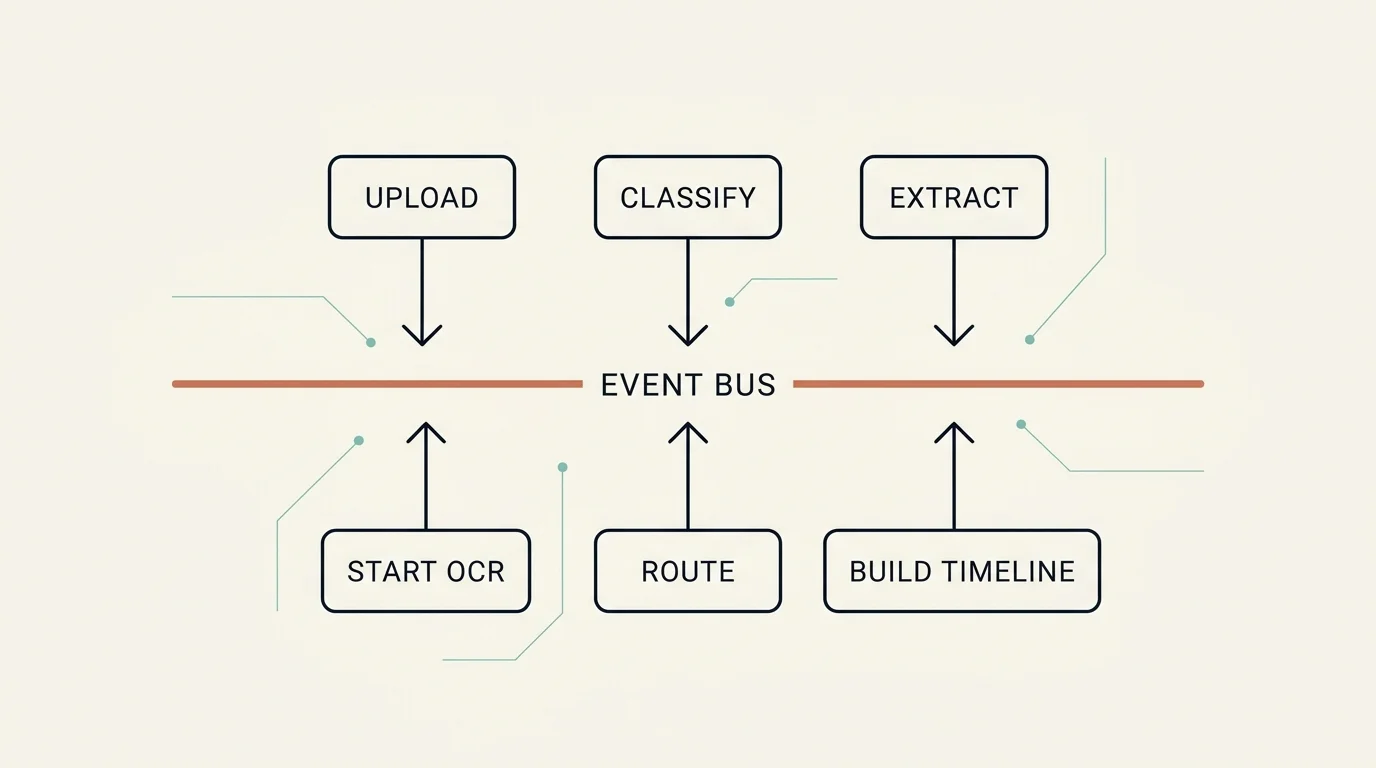
This event spine is what makes the pipeline composable rather than a rigid script. A transcript completing, for instance, kicks off an entirely different downstream workflow than a clinical record completing. New document journeys are added by subscribing to events, not by editing one monolithic function.
Retries, timeouts, and a polling state machine
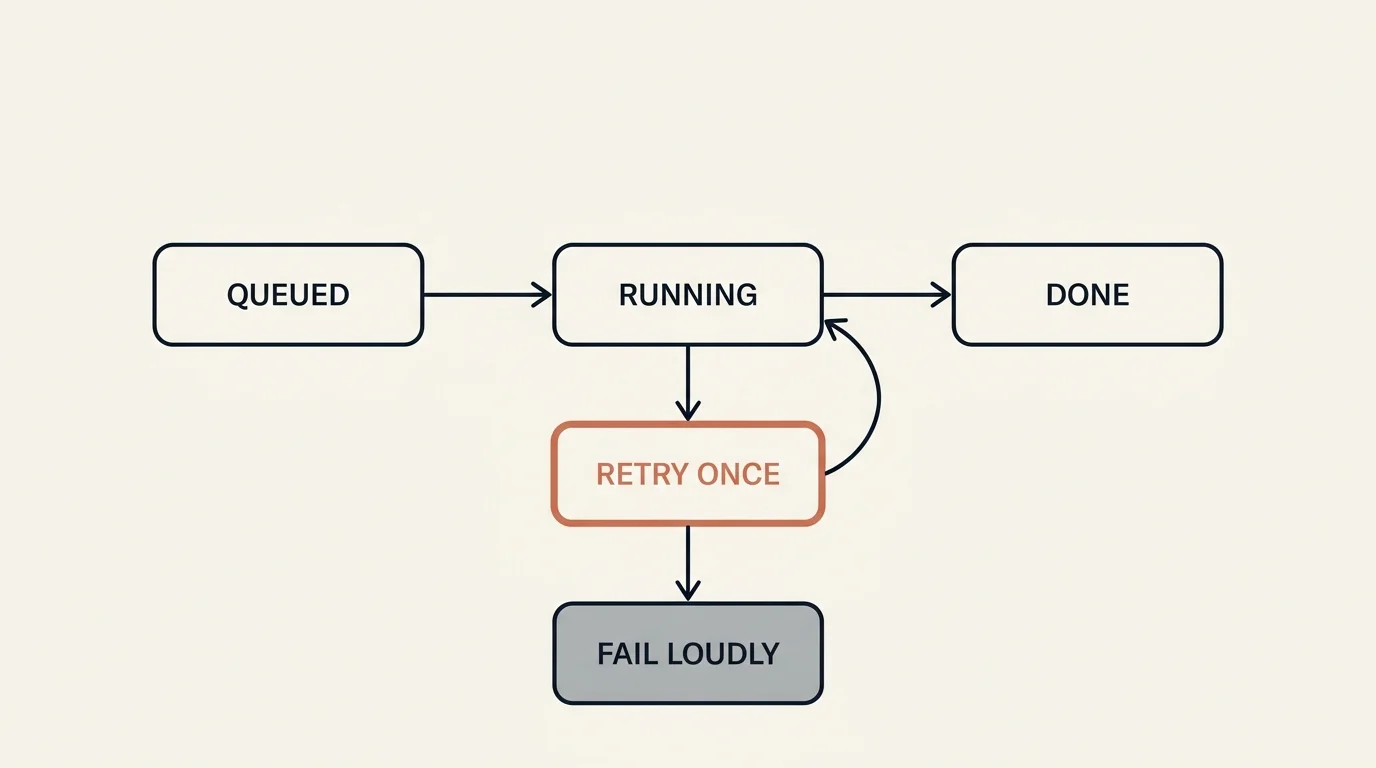
The error handling should be deliberately boring, which is the right instinct. Classification status moves through a small machine, and the "running" state is one another worker can poll behind with exponential backoff rather than duplicating the work.
Timeouts should scale with document size, because a 600-page document legitimately takes longer than a 5-page one — a fixed timeout would either kill big documents prematurely or let stuck small ones hang. A floor (say, tens of minutes) plus a per-page allowance, raced against the work, handles both ends.
The retry policy across classification and extraction is uniformly try once more, then fail loudly. A single retry catches the transient failures (a flaky API call, a momentary rate limit) without papering over real bugs through infinite retry loops. If the second attempt fails, the error surfaces. That restraint — retry once, then let it break visibly — is the difference between a pipeline you can debug and one that silently swallows failures until a case is mysteriously incomplete.
What Do the Two Parts Add Up To?
Step back and the shape is clear. The pipeline perceives (OCR + hierarchical classification, Part 1), then acts (route, extract, assemble, Part 2). The intelligence is distributed across the whole system, not concentrated in one model: a cheap general LLM does bulk page typing, a specialized model handles the high-stakes judgment call, geometry-aware parsing handles tables, and a deterministic merge assembles the timeline. Around all of it sits the part that actually makes it production-grade — decoupled stages, page-count capacity metering, event-driven orchestration, reversible skips, per-event cost accounting, and retry logic that fails loudly.
That is the real lesson of building IDP. The model is a component. The system is the product.
FAQ
Why route and skip documents instead of just extracting everything?
Cost and signal. Extraction is the expensive step — it runs LLM calls per page and produces structured records. Documents like ID cards, fax covers, and routine forms add nothing to a case timeline, so spending extraction budget on them is pure waste. Routing is a cheap classification-driven gate that drops low-value documents before the expensive step. Crucially, every skip should be reversible and restore the document's exact prior status, so the cost savings never come at the price of losing information a human might later need.
Why detect a source format before extracting?
Because document structure varies enormously by source. Different institutions encode the same conceptual data in completely different layouts. A single generic extractor would parse all of them mediocrely. Detecting the format first — from page types, source names, content patterns, and filename hints — lets the pipeline dispatch to a generator tuned for that shape, which is the difference between a usable extraction and a garbled one.
Why store both flattened and layout-preserving OCR output?
The two consumers have different needs. Classification reads flat per-page text (it only cares about words, not their position), so it uses the lightweight format. Table extraction needs spatial structure: to align a code with its amount and date, you must know which values share a row and which column they fall under. That requires the bounding boxes and table blocks in the layout-preserving output. Keeping both means each consumer reads the representation shaped for it.
How does the system meter load when document sizes vary so much?
It meters by page count, not job count. A capacity queue tracks total pages in flight against a maximum, and only admits a new document when there is room for its pages. This matters because resource consumption (memory, CPU, LLM tokens) scales with pages, not documents. Five 600-page records are a far heavier load than fifty 2-page cards, and a job-count limiter would treat them as equal. Timeouts scale the same way: a floor plus a per-page allowance.
How are AI-generated values distinguished from human corrections?
Every extracted record should carry "generated" and "modified" flags in its metadata, and both records and timeline events should keep full authorship and soft-delete fields (who created, updated, or deleted, and when). Together they preserve provenance — the system always knows what the model produced versus what a reviewer changed. In a domain where the output can end up in litigation, that audit trail is a hard requirement, not a nicety.
This is Part 2 of a two-part series on building a production Intelligent Document Processing pipeline. ← Part 1 covers OCR and the classification hierarchy
Subscribe to the newsletter
About the Author
Aaron is an engineering leader, software architect, and founder with 18 years building distributed systems and cloud infrastructure. Now focused on LLM-powered platforms, agent orchestration, and production AI. He shares hands-on technical guides and framework comparisons at fp8.co.
Cite this Article
Related Articles
Intelligent Document Processing: OCR & AI Classification
How a production IDP pipeline turns 500-page medical-legal bundles into structured data with OCR and a 3-level LLM classification hierarchy.
AI EngineeringContext Engineering for AI Agents: Cost and Reliability
Learn how caching, tool selection, memory and retrieval shape agent context, with cost calculations, failure cases and an evaluation checklist.
AI EngineeringAI Agent Memory: Why Binding Matters More Than Recall
Discover why AI agent memory fails at binding, not recall. 500+ experiments reveal architecture patterns that fix context-action gaps.
AI Engineering