MCP Explained: Complete Protocol Guide 2026
Master Model Context Protocol from architecture to implementation. Build MCP servers, understand the spec, and integrate with Claude Code and Cursor.
TL;DR: Model Context Protocol (MCP) is an open standard that provides a universal JSON-RPC interface for connecting AI models to external tools, data sources, and services — replacing fragmented per-tool integrations with a single, composable protocol.
Key Takeaways
- MCP is an open protocol using JSON-RPC 2.0 that standardizes how AI applications discover and invoke external tools, eliminating the N×M integration problem.
- The architecture follows a client-server model with three primitives: tools (actions), resources (data), and prompts (templates) — each independently discoverable.
- MCP supports stdio and HTTP+SSE transports, enabling both local process-based servers and remote network-accessible deployments.
- Building an MCP server requires as few as 30 lines of TypeScript or Python, making it accessible to any developer familiar with basic API patterns.
- Claude Code, Cursor, Cline, Windsurf, and VS Code Copilot extensions all support MCP, creating a broad ecosystem of interoperable AI tooling.
- MCP solves what function calling cannot: persistent connections, stateful sessions, dynamic tool discovery, and cross-client portability of integrations.
What is Model Context Protocol (MCP)?
Model Context Protocol (MCP) is an open standard published by Anthropic that defines a universal interface for connecting AI assistants to external data sources, tools, and services. Think of it as USB-C for AI integrations — one protocol that works everywhere, replacing dozens of proprietary connectors.
MCP establishes a structured communication layer between AI applications (called "hosts") and capability providers (called "servers"). The protocol uses JSON-RPC 2.0 as its messaging format, supports capability negotiation at connection time, and provides three distinct primitives for different types of interactions: tools for executing actions, resources for reading data, and prompts for reusable templates.
The specification lives at spec.modelcontextprotocol.io and is maintained as an open standard. Any AI client can implement the protocol, and any developer can build servers that instantly become available to every MCP-compatible tool in the ecosystem.
What makes MCP particularly significant in 2026 is its adoption velocity. Within 18 months of its initial release, MCP support has been integrated into Claude Code, Cursor, Cline, Windsurf, GitHub Copilot, and dozens of VS Code extensions — making it the de facto standard for AI tool integration.
How does MCP work?
MCP follows a client-server architecture where the AI application acts as a host managing one or more client connections, and each MCP server exposes a specific set of capabilities.
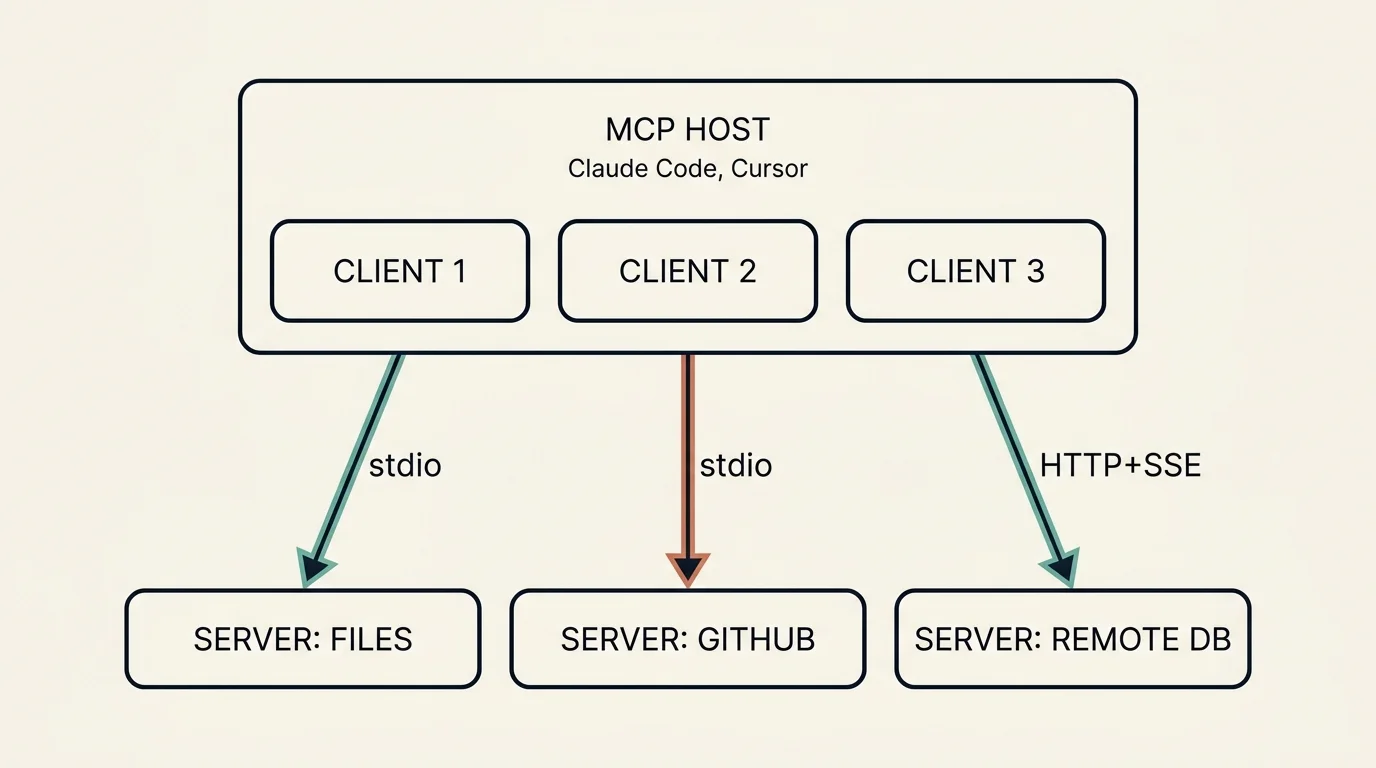
A single MCP host (Claude Code, Cursor) runs one client per connection. Each client speaks to a dedicated MCP server over a transport — stdio for local servers (filesystem, GitHub), HTTP+SSE for remote ones (a hosted database). The host multiplexes across all of them.
The connection lifecycle works as follows:
- Initialization: The host spawns or connects to an MCP server. The client sends an `initialize` request containing its supported protocol version and capabilities.
- Capability negotiation: The server responds with its own capabilities — which primitives it supports (tools, resources, prompts) and any optional features like logging or sampling.
- Discovery: The client calls `tools/list`, `resources/list`, or `prompts/list` to enumerate available capabilities.
- Invocation: When the AI model decides to use a tool, the client sends a `tools/call` request with the tool name and arguments. The server executes the operation and returns results.
- Session management: The connection persists for the duration of the session, allowing stateful interactions and server-initiated notifications.
Transports define how messages travel between client and server:
- stdio: The host spawns the server as a child process and communicates via stdin/stdout. Best for local tools, fast, zero network configuration. This is what Claude Code and Cursor use by default.
- HTTP + Server-Sent Events (SSE): The client connects to the server over HTTP. The server uses SSE for pushing messages to the client. Best for remote servers, shared team infrastructure, and cloud deployments.
All messages follow JSON-RPC 2.0 format — requests carry a method name and params object, responses carry a result or error object.
What problem does MCP solve?
Before MCP, every AI tool built its own integrations from scratch. Claude had its own tool-use format, GPT had function calling, and every IDE extension reimplemented connections to GitHub, databases, and file systems independently.
This created an N x M integration problem: N AI clients each needing custom adapters for M services. If you had 5 AI tools and 20 services, you needed up to 100 separate integrations — each with its own authentication handling, error formats, and maintenance burden.
MCP collapses this to N + M: each AI client implements one protocol, each service exposes one server, and everything connects.
Beyond the integration math, MCP solves several problems that simple function calling cannot address:
- Dynamic discovery: Tools are discovered at runtime, not hardcoded at prompt time. A server can add new capabilities without any client-side changes.
- Persistent state: MCP connections are long-lived sessions. A database server can maintain a connection pool, a browser automation server can keep a page open across multiple interactions.
- Portability: An MCP server you build for Claude Code works immediately in Cursor, Cline, or any other MCP-compatible client. Write once, use everywhere.
- Security isolation: Servers manage their own credentials. The AI model never sees API keys — it only sees the tool interface.
- Composability: Multiple servers can be active simultaneously, each providing different capabilities that the AI can combine freely.
MCP vs Function Calling: What's the difference?
Function calling (as implemented in OpenAI, Anthropic, and other APIs) and MCP serve different layers of the stack. Here is a direct comparison:
In practice, MCP and function calling are complementary. Claude Code uses MCP to connect to external servers, and those servers' tools get presented to the model as function calls in the underlying API. MCP is the connectivity layer; function calling is the invocation mechanism within a single model turn.
The key insight: function calling tells the model what tools exist. MCP tells the client where to find tools and how to execute them.
How do you build an MCP server?
Building an MCP server is straightforward with the official SDKs. Here is a complete TypeScript server that exposes a single tool for checking website status:
To use this server with Claude Code, add it to your project's .mcp.json:
For Python developers, the FastMCP framework provides an even more concise API:
Both examples produce fully spec-compliant MCP servers that work with any client. The SDKs handle JSON-RPC framing, capability negotiation, and transport management automatically.
Which AI tools support MCP?
As of May 2026, MCP has been adopted across the major AI development tools:
- Claude Code (Anthropic) — Full MCP support via `.mcp.json` project configuration and `~/.claude/mcp.json` for user-level servers. Supports stdio and SSE transports.
- Cursor — MCP integration in settings, supports project-scoped and global server configurations. One of the earliest third-party adopters.
- Cline (VS Code extension) — Acts as a full MCP host, managing multiple client connections with explicit user approval for all server actions.
- Windsurf (Codeium) — MCP support for tool extensibility within its AI-powered IDE.
- GitHub Copilot — MCP server support in VS Code via the Copilot extension settings.
- VS Code (native) — Built-in MCP support in the Chat panel starting with VS Code 1.99.
- Continue (open-source) — MCP-compatible AI coding assistant with full server support.
- Zed — MCP integration in its AI assistant panel.
- Amazon Q Developer — MCP server support for extending Q's capabilities.
The MCP server ecosystem includes thousands of community-built servers available via npm, PyPI, and the official MCP Server Registry. Popular categories include database connectors (PostgreSQL, MongoDB, Redis), cloud service integrations (AWS, GCP, Cloudflare), developer tools (GitHub, Linear, Jira), and browser automation (Playwright, Puppeteer).
What are MCP resources, tools, and prompts?
MCP defines three primitives that servers can expose, each serving a distinct purpose:
Tools
Tools are executable actions that the AI model can invoke. They represent operations with side effects — querying a database, creating a file, sending a message, or calling an API. Tools are the most commonly used primitive.
Each tool has a name, description, and a JSON Schema defining its input parameters. The server validates inputs and returns structured results. Examples: run_query, create_issue, send_email.
Tools are model-controlled — the AI decides when and how to call them based on the user's intent.
Resources
Resources represent read-only data that provides context to the AI. They use URI-based addressing (like file:///path/to/doc or postgres://db/table) and can be static or dynamic. Resources let the AI access information without executing actions.
Examples: a file's contents, a database schema, a configuration object, the current user's profile. Resources support subscriptions — the server can notify the client when resource contents change.
Resources are application-controlled — the host application decides which resources to attach to the conversation context.
Prompts
Prompts are reusable templates that define structured interactions. They can include placeholders for arguments and can reference tools or resources. Think of them as saved workflows that users can invoke by name.
Examples: a code-review prompt that takes a file path argument, or a summarize-pr prompt that fetches PR data and formats a summary. Prompts are user-controlled — they are explicitly selected by the user from a menu or command palette.
The three-primitive model provides clean separation: tools for doing, resources for knowing, prompts for orchestrating.
What are best practices for MCP server development?
Building production-quality MCP servers requires attention to several key areas:
1. Keep tools focused and composable. Each tool should do one thing well. Rather than a monolithic manage_database tool, expose run_query, list_tables, and describe_schema as separate tools. This gives the AI model clearer choices and reduces error rates.
2. Write descriptive tool schemas. The model relies entirely on your tool's name, description, and parameter descriptions to decide when and how to use it. Invest time in clear, specific descriptions. Include examples of valid inputs in parameter descriptions.
3. Handle errors gracefully. Return structured error messages in the tool result rather than throwing exceptions. Include enough context for the model to understand what went wrong and suggest a fix. Never expose internal stack traces.
4. Use stateful connections wisely. MCP's persistent sessions enable connection pooling, caching, and incremental operations. A Git server can maintain a working tree reference across multiple tool calls. A browser server can keep a page open between navigation steps.
5. Implement proper security boundaries. Never accept credentials from the AI model. Store secrets in environment variables or secure vaults. Validate all inputs against your schema before execution. Consider rate limiting for servers exposed over HTTP.
6. Test with multiple clients. An MCP server should work identically across Claude Code, Cursor, and Cline. Test with at least two clients during development to catch assumptions about client behavior. The MCP Inspector (npx @modelcontextprotocol/inspector) provides a standalone test UI.
What's the future of MCP?
MCP's trajectory in 2026 points toward becoming infrastructure-grade protocol rather than a developer convenience:
Enterprise adoption is accelerating as organizations recognize that MCP servers provide a governed, auditable interface between AI assistants and internal systems. Companies can expose internal APIs through MCP servers with consistent authentication, logging, and access control — without giving AI models direct access to production systems.
The Streamable HTTP transport (replacing the older SSE-based approach) enables better scalability for remote servers, supporting stateless request-response patterns alongside persistent streaming when needed.
Server registries and marketplaces are emerging, making it possible to discover and install MCP servers as easily as npm packages. The official MCP Server Registry, community collections, and IDE-integrated marketplaces reduce the friction of finding the right server for your use case.
Standardization efforts continue to refine the spec. The protocol's governance model ensures backward compatibility while allowing the addition of new capabilities like authentication standards (OAuth 2.1 integration), batch operations, and binary content support.
Composable AI architectures increasingly rely on MCP as the glue layer. Multi-agent systems use MCP to give each agent access to different tool sets. Orchestration frameworks use MCP servers as capability modules that can be mixed, matched, and swapped without code changes.
The pattern is clear: just as REST became the universal language for web APIs, MCP is becoming the universal language for AI-tool connectivity. Developers who invest in building MCP servers today are creating infrastructure that will serve the entire AI ecosystem for years to come.
FAQ
What is an MCP server?
An MCP server is a lightweight program that exposes tools, resources, or prompts over the Model Context Protocol. It receives JSON-RPC requests from AI clients, executes the requested operations (like querying a database or calling an API), and returns structured results. Servers can run as local processes (via stdio) or as remote services (via HTTP). Any developer can build one using the official TypeScript or Python SDKs in under 50 lines of code.
How do I connect an MCP server to Claude Code?
Create a .mcp.json file in your project root (for project-scoped servers) or edit ~/.claude/mcp.json (for global servers). Each entry specifies the server name, the command to launch it, and any arguments or environment variables. For example: {"mcpServers": {"my-server": {"command": "node", "args": ["./server.js"]}}}. Claude Code automatically starts configured servers when you begin a session and discovers their tools during initialization.
Is MCP an open standard?
Yes. MCP was created by Anthropic and released as an open specification with no licensing restrictions on implementation. The spec is publicly available at spec.modelcontextprotocol.io, the reference SDKs are MIT-licensed, and any organization can implement clients or servers without permission or royalty. Multiple competing AI tools (Claude Code, Cursor, Cline, GitHub Copilot) have independently implemented MCP support, confirming its vendor-neutral status.
What languages can you build MCP servers in?
The official SDKs support TypeScript/JavaScript and Python, which cover the majority of MCP servers in the ecosystem. Community SDKs extend support to Rust, Go, Java, Kotlin, C#, Ruby, and Swift. Since MCP uses JSON-RPC 2.0 over standard transports (stdio or HTTP), you can technically implement a server in any language that can read from stdin, write to stdout, and parse JSON — the protocol itself is language-agnostic.
Subscribe to the newsletter
About the Author
Aaron is an engineering leader, software architect, and founder with 18 years building distributed systems and cloud infrastructure. Now focused on LLM-powered platforms, agent orchestration, and production AI. He shares hands-on technical guides and framework comparisons at fp8.co.
Cite this Article
Related Articles
How Cline Implements MCP: Source Code Deep Dive (2026)
Cline MCP internals decoded: JSON-RPC 2.0 messaging, tool discovery, security approvals, and spec compliance — all from real source code.
Agentic AIHow to Build Claude Code Skills: 5 Examples (2026)
Build custom Claude Code Skills with 5 ready-to-use examples. Covers SKILL.md spec, security controls, plugin distribution, and team sharing workflows.
AI Development ToolsAI Coding Agent Architecture: Agent Loop Deep Dive
Explore how Claude Code, Cursor, Aider, and Cline work under the hood. Agent loops, tool dispatch, and edit strategies explained.
AI Engineering